The recital is in June, and tonight the studio ran itself.
You taught three classes, ran a competition rehearsal and locked up at nine. This is the other work, the part that used to happen after you got home.
100% free to use, no hidden fees. Members pay about 5% at checkout.
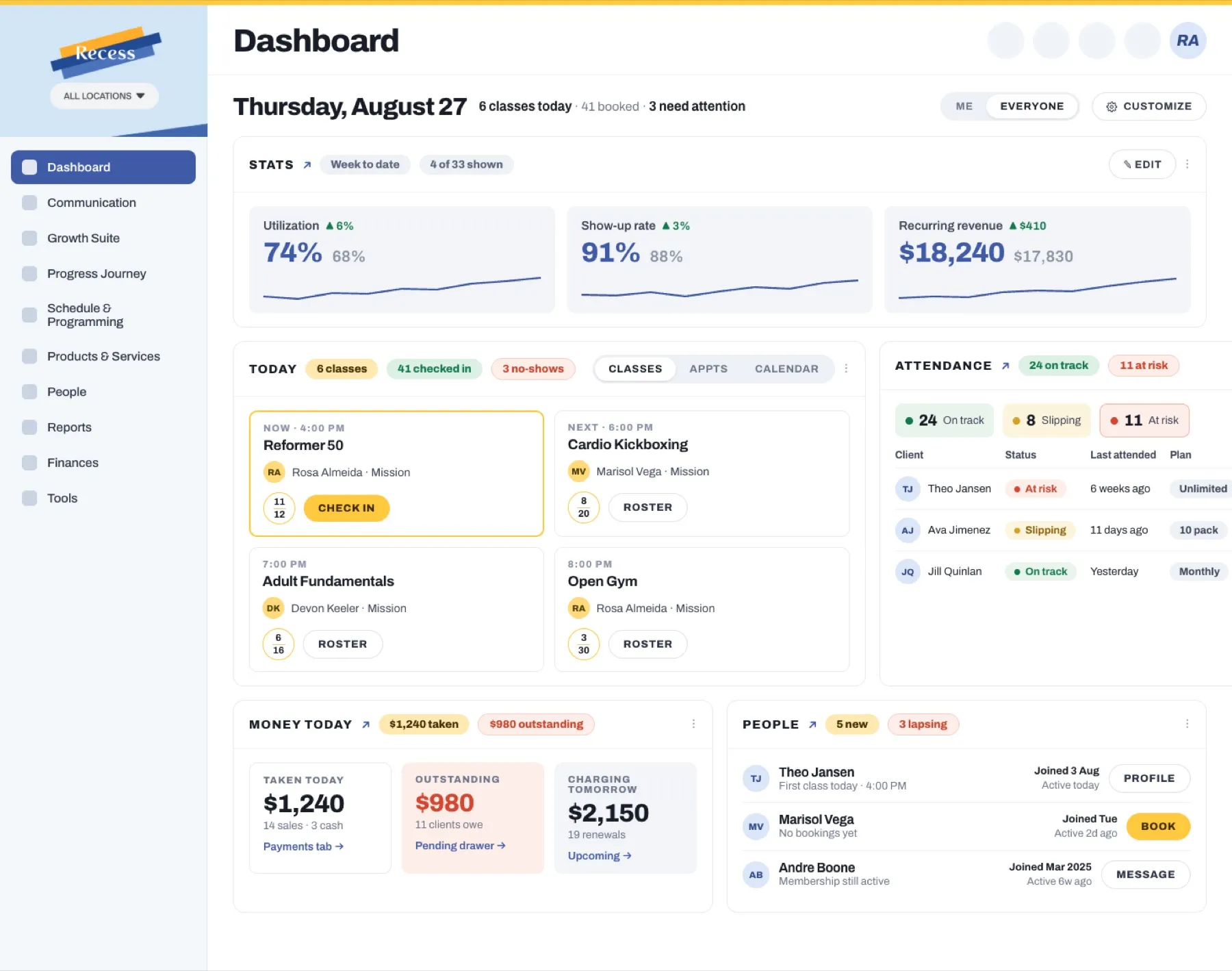
Costume season billed itself while you slept.
Costume balances came due at midnight, so you woke up to them paid. Recess charged each dancer's costume fee to the card her family already has on file, once for every class she is performing in, at the price you set for that class. A family with three dancers got three costume charges on one card, in one run, and nobody at the desk had to work out who owed what.
This is the part of dance that ordinary booking software never sees. Tuition, costume fees, recital tickets and competition fees are not four products from four different tools. They are one family's account, billing on a rhythm you set once for the whole season.
Three cards declined during the run and all three are already retrying on their own. That is the Thursday afternoon you were going to spend on the phone.
Recreational and competition are two businesses sharing one building.
You moved a dancer out of Intermediate Jazz and onto the competition team's Tuesday rehearsal. Recess runs those as two programs rather than two labels: their own schedules, their own pricing, their own agreements and their own rosters, sitting on top of the same family accounts. A dancer can be in both, and usually is.
The place she left did not sit empty until January. It went to the waitlist in order, the first family took it, and the new dancer's tuition prorated to the weeks left in the season instead of charging her for the ten she missed.
Her costume order moved with her. The roster, the teacher's list and what each family owes all agree with each other, which is not a small thing in week eleven with a vendor deadline in nine days.
One mother, three dancers, six classes, one number at the bottom.
Her eldest takes four classes a week, the middle one takes two, and the youngest started Creative Movement in September. Recess does not treat that as six customers. It is one family account with one payer, three dancers and one monthly tuition figure that already has the multi-class and sibling discounts inside it.
In February the middle daughter drops tap. The discount recalculates itself, on the account, in the right order, so you do not get the call in March asking why the bill went up when a child stopped dancing.
Each dancer still has her own record underneath: her classes, her attendance, her forms, her balance and her notes. One bill on top, three dancers beneath it, and the same picture visible to her mother in your app.
Your teachers are not all paid the same way, and the run already knows that.
One teacher is on a per-class rate. One runs privates and is paid per appointment. Your competition director is on a fixed stipend for the period. That is three different kinds of pay inside one half-month run, and Recess assembles it from the schedule that already happened rather than from a spreadsheet somebody keeps.
It also tells you what it could not work out. A staff member with no matching pay rate is flagged before you approve rather than discovered after you have paid, and nothing is locked until you approve it.
Teachers clock in and out on the same system that holds their rate, so the class somebody covered at short notice lands on her timesheet at her rate without a conversation about it.

The season, not the evening, is the number you actually need.
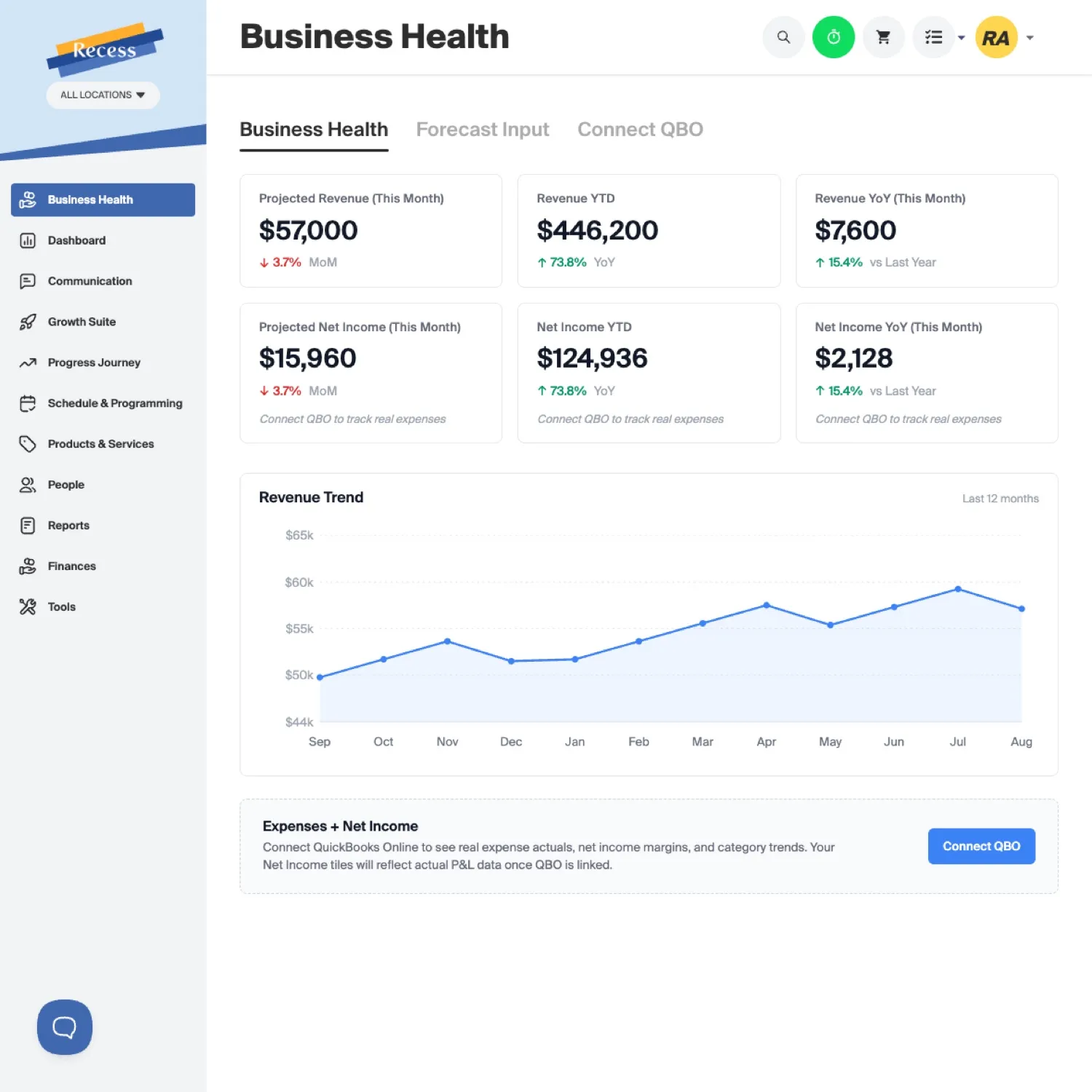
Monthly tuition ran while you were teaching. What you can look at now is not the day's total. It is tuition against costume revenue against recital tickets against what you paid your teachers this month, because clock-ins, pay rates and payroll sit in the same system as the money coming in.
Business Health connects QuickBooks, so revenue, costs, payroll and a forward forecast are in one place, and you can ask it a question in plain language instead of building a spreadsheet at eleven at night.
And the family that stopped coming in January got a message today, in your studio's voice, from your studio's own email domain, without you remembering that they existed.
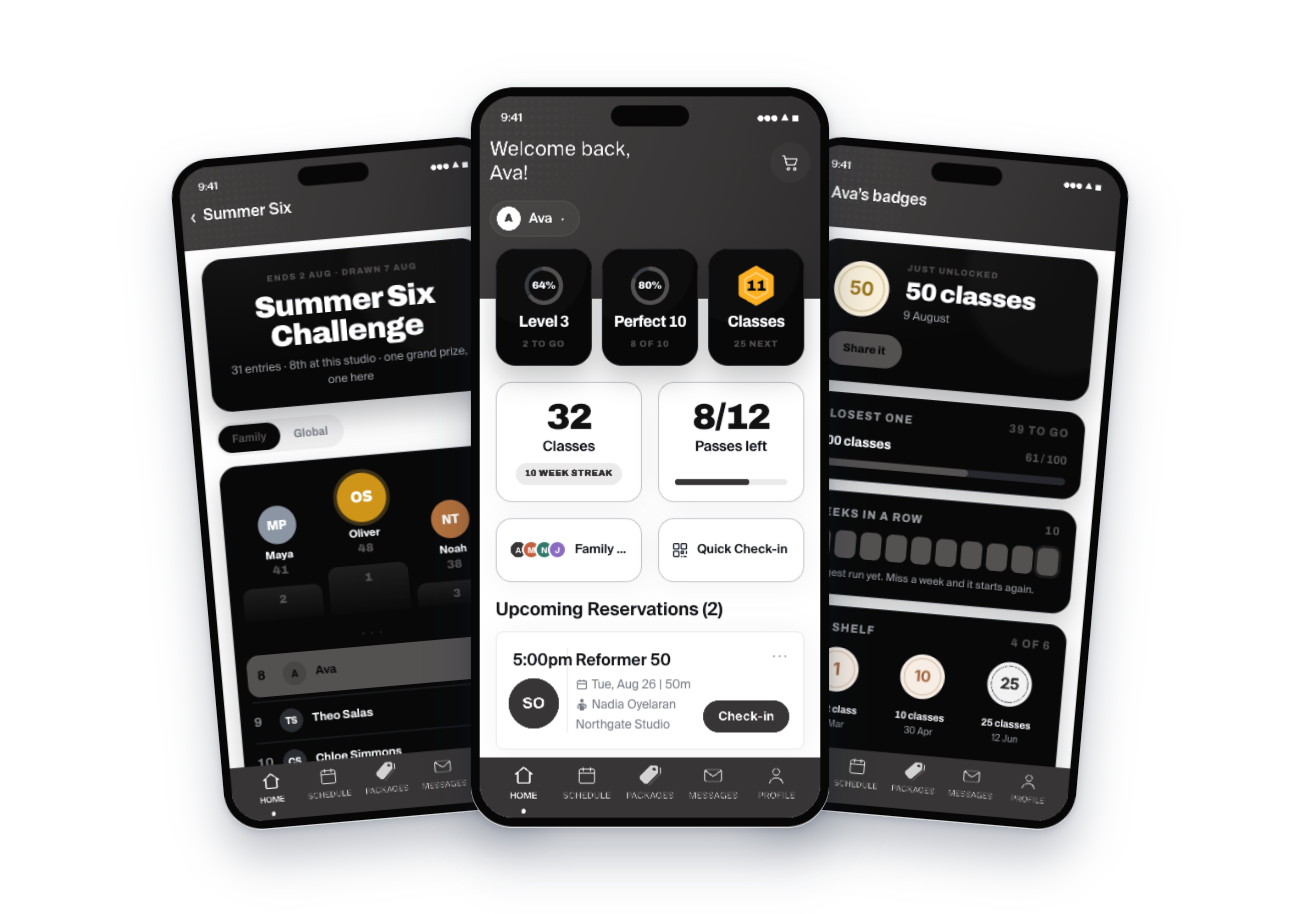
She can see all three dancers without emailing the front desk.
Your studio gets its own app carrying your name, your logo and your colors, publishable to the Apple App Store and Google Play under your own listing. Parents are not asked to download another company's app to find out when their daughter dances.
A mother opens it and switches between her children. She sees which classes each one is in this week, what she owes and when it charges, signs the forms, messages you, and books the make-up class for the Tuesday one of them missed, without anyone at your desk being involved.
The dancers get their own side of it: classes attended, badges they have unlocked, and a studio challenge with a family tab, which is the one leaderboard a nine year old actually wants to be top of.
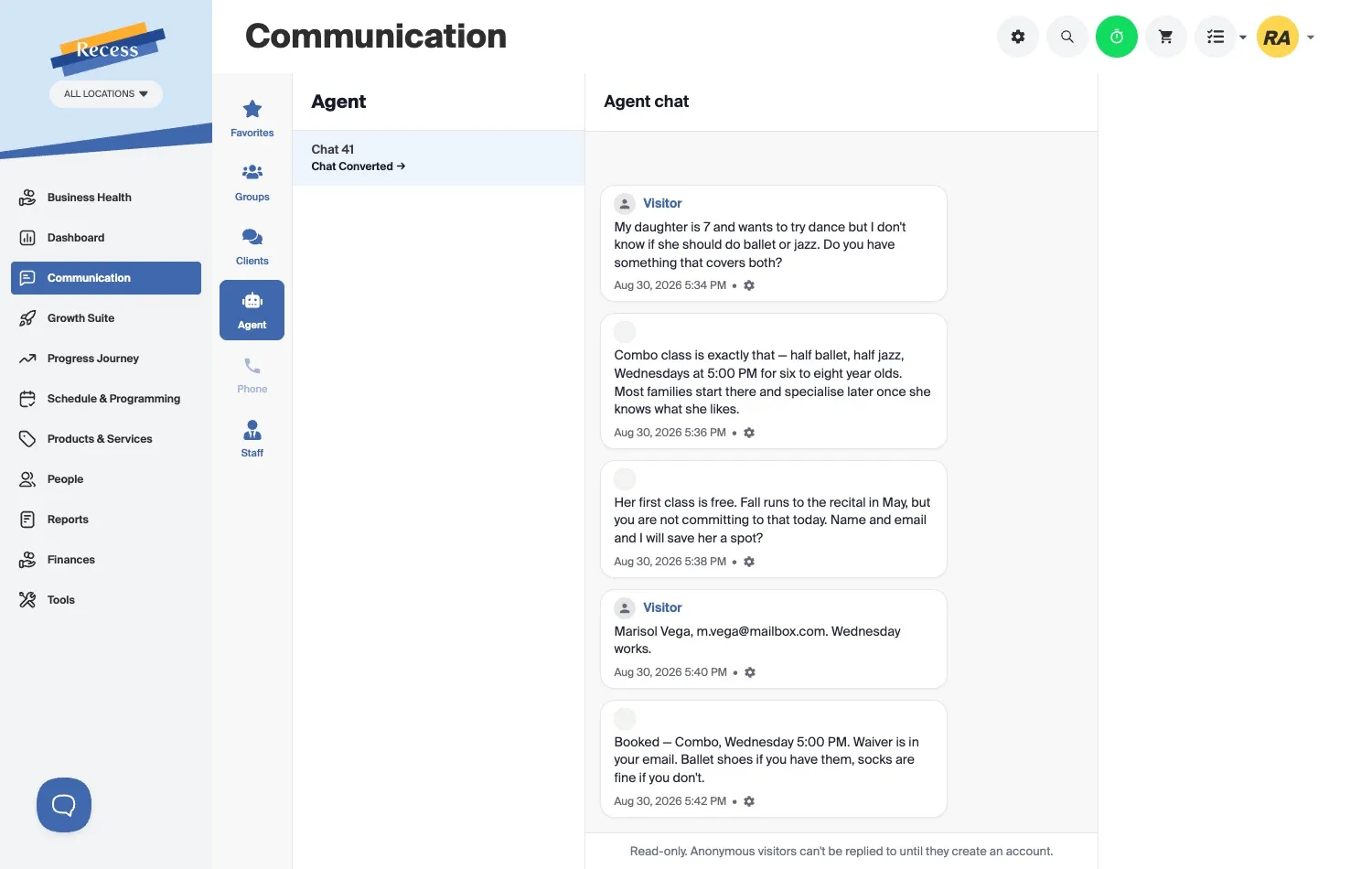
Ballet or jazz for a seven year old, answered and booked in eight minutes on a Sunday.
A mother found you on a Sunday and asked the question every dance studio gets. Her daughter is seven, she wants to try, and her mother has no idea whether that means ballet or jazz.
The Recess lead agent answered the actual question. It explained that the combo class is half of each, gave her the day, the time and the age range it is for, told her the first class is free, and was straight with her that the fall season runs to the recital in May. Then it took her name and saved the place.
Nobody at your studio touched a phone. The alternative is the one every owner recognizes: you reply on Tuesday, and by then she has enrolled at the studio across town that answered first.
The rest of what a dance studio runs on, all of it included.
Nothing here is a tier, an add-on, or a module you have to call sales about. A studio with sixty dancers gets exactly what a studio with six hundred gets.
What a free season actually costs you.
No monthly platform fee, no per-feature add-ons, no setup cost. Recess earns a service fee of about 5% paid by the family at checkout, and card and bank processing is covered by Recess out of that rather than billed to you on top. We only do well when you are collecting tuition, which is the incentive you want your software to have.
Studios we would turn away.
If one of these is you, we would rather say so now than six weeks into an onboarding.
What dance studio owners ask before they move a season across.
Yes, and it is the reason Recess exists. A season is a program with a start and end date, a weekly schedule, a roster, its own agreements and its own tuition. Families enroll for the season instead of booking each week, and tuition bills on the rhythm you set. Drop-ins still work if you want them.
Yes. She is one dancer with one profile, enrolled in four classes, attending each of them, on one tuition figure that reflects all four. Multi-class discounts apply automatically. Her parent sees one bill, not four.
As scheduled fees against the family's account. You set a costume price per class, decide when it is due, and it charges to the card already on file, once for each class the dancer is performing in. Recital tickets, competition fees and any custom fee work the same way. Nothing leaves the system to be collected in cash and remembered later.
Yes, and this is a core case rather than a workaround. The family account holds one payer and several children, each with her own classes, attendance and forms. Sibling discounts apply in the right order automatically, and they recalculate when one child pauses for a season while the others carry on.
Yes. They run as separate programs, with different schedules, pricing, agreements and rosters, sitting on the same family accounts. A dancer in both appears in both, pays once, and her parent sees the whole picture in one place.
Locations are built in, not bolted on. Each has its own schedule, rooms and staff, while clients, billing and reporting stay unified. A family with a dancer at each location has one account. You do not run two copies of your studio and reconcile them by hand.
Yes. The migration is automated and our team runs it for you, whatever you are on now: Jackrabbit, The Studio Director, DanceStudio-Pro, Akada and others. Dancers, history and billing information come across so your season starts with records rather than a blank list.
No. Your studio gets its own branded app with your name, logo and colors, and it can be published on the App Store and Google Play under your own listing. Parents enroll, pay, sign forms, message you and see every dancer's schedule there.