Here is everything your box did today, without you.
One ordinary day, from the 4:52am door to the lead that booked itself in the evening, and not one minute of it needed you in the building.
100% free to use, no hidden fees. Members pay about 5% at checkout.
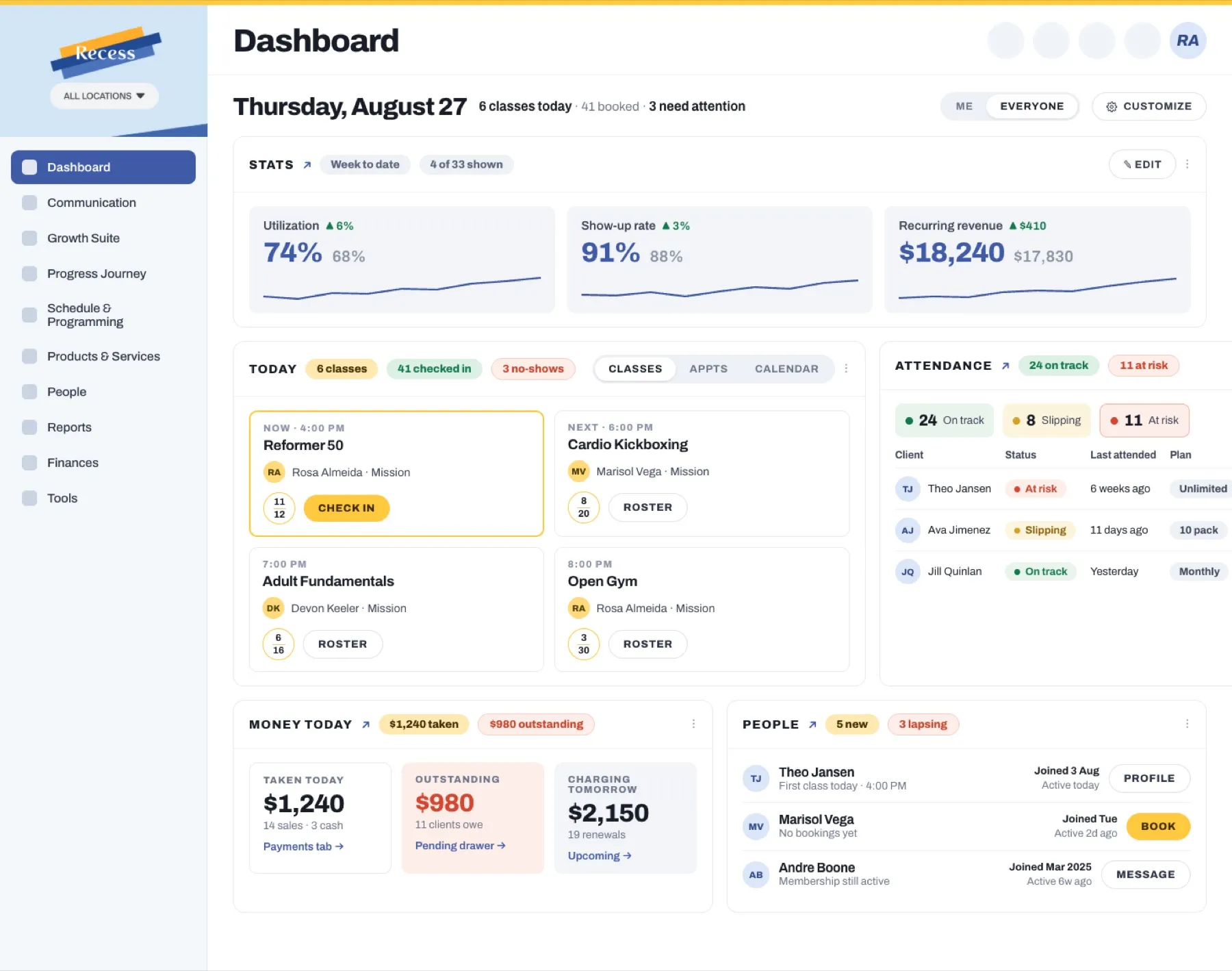
The door opens for a membership, not for a fob.
Your 5am has no staff in it. It never has. Whoever arrives first is whoever arrives first, and for years the answer to that has been a key fob, a code taped inside a cabinet, or one trusted member with a key who moves away in June and takes your access control with her.
Recess connects to Kisi, so access stops being a fob and becomes your membership record. When she holds her phone to the reader at 4:52, the door asks a question in real time: membership active, payment current, waiver signed, inside her access window. If yes, the lock releases. If no, it does not, and nobody at your gym has to be the person who says so out loud.
That last part is what owners underrate. The awkward conversation about a card that failed three weeks ago is one you have been having in person, at the whiteboard, in front of eight people warming up. The door has it instead, quietly, and by the time it comes to that Recess has already texted her twice and tried the card three times.
Access follows the membership type too. An open gym only tier gets in during open gym windows and not at 6pm when a class is running in the space. A member on hold does not get in until the hold ends. When someone cancels, access ends the day the membership ends, because it is the same record. There is no separate list of fobs to prune, which is the list every box eventually stops pruning.
The board was set before anyone arrived, and it is not our board.
The workout on the whiteboard did not come from Recess, and it should not. Programming is its own craft, and your members chose your box partly because of how you write it. Recess integrates with CAP, which is where a lot of boxes already write and track their programming, so the two are not separate worlds you have to keep in sync by hand.
What Recess runs is everything around the workout. A box schedule is not one class a day. It is 5:00, 5:30, 6:00, 6:30, 9:30, noon, 4:00, 4:30, 5:30 and 6:30, plus open gym on either side, a barbell club on Saturday morning and a foundations course starting next month.
You build that once with class templates, it repeats, and you change one slot without rebuilding the week.
Three days in the gym, and the barbell club was never on offer.
Saturday's barbell club asks for foundations completed. He signed up on Wednesday and has not done it yet, so the class was not bookable for him, and the app told him foundations is the thing standing between him and Saturday. He booked foundations instead.
The alternative is the morning every box has lived through. He turns up Saturday, a coach works out mid warm up that this man has never held a barbell, and either the class gets taught to the wrong person or somebody has an awkward five minutes at the door. Gating means the class was never on offer, so nobody has to be the one who says it.
You gate a class on the level or rank a member holds, a skill a coach has signed off, a prerequisite course like foundations, an age, a tag on the member, or the membership or program they are on. Most boxes gate foundations first and leave the rest of the schedule open to anyone.
The whiteboard is the point. Recess keeps the ladder behind it.
Boxes count things. It is the whole culture: the board, the name on it, the number beside the name. Recess does not write your scores and it does not pull them out of CAP. What it holds is the ladder people are climbing.
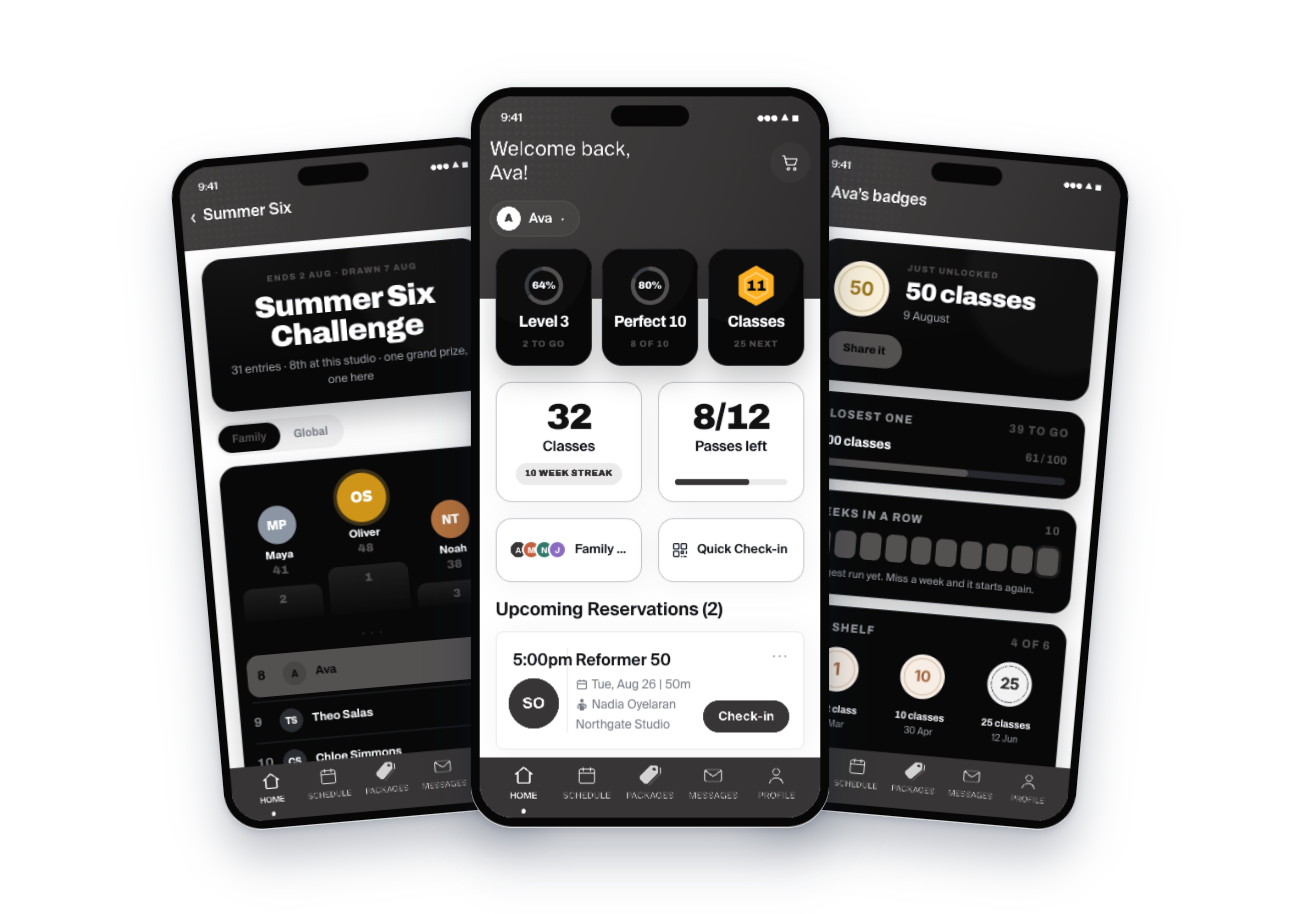
Clubs, challenges, points, milestones and leaderboards. A hundredth class, a first strict pullup a coach has signed off, a six week attendance challenge, all of it visible to the member in your own app between sessions rather than only on the wall on the day it happened.
You define the milestone, you print the certificate with your own artwork, and she can see where she sits without having to remember. Progression is the newest part of Recess and is rolling out now.
Nineteen days without a scan, and she got a message.
This is the part that actually decides whether your box is here in three years. Not the schedule. The member who came four times a week for two years, got busy in August, missed a week, felt behind, and quietly stopped.
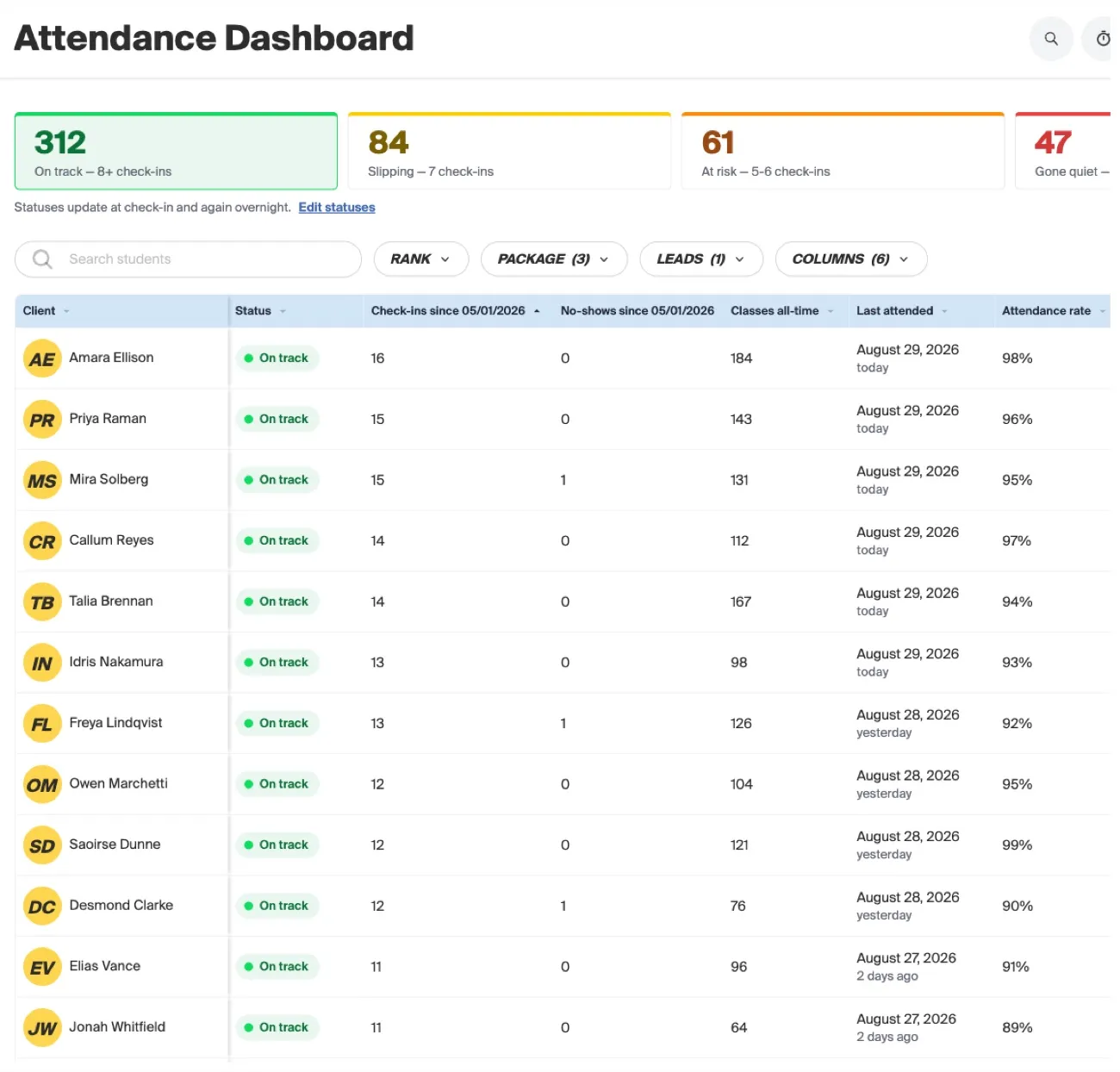
Recess watches attendance per member, so that person surfaces as a name in days rather than as a number at quarter end. Then the software does the follow up instead of adding it to your list. Automated sequences reach out by text or email in your gym's voice, from your own domain, and lapsed members get won back without a staff member remembering to try.
Nobody at a box quits on a Tuesday and announces it. They stop scanning in. The only useful version of retention is the one that notices inside a fortnight.
Nine classes, four coaches, three rates, and a run waiting on your approval.
Coaches at a box are almost never salaried. They are paid by the class, and often not at the same rate for a foundations session as for a regular WOD, or for the hour somebody covered on open gym. Recess holds those rates per coach and by class type, or by head count if that is how you do it.
By the time the last class ends, the day's coach pay is already on the run, costed against who actually taught. If somebody covered the 9:30, the 9:30 lands in her pay and not in his, because pay follows the class rather than the roster you published on Sunday.
Coaches clock in and out if you run shifts, and payroll comes off the same data that ran the schedule. At the end of the period you open a run that is already built, look at whatever it has flagged for review, and approve it.

Your name on the app they open at five in the morning.
Your box gets its own branded app carrying your name, your logo and your colors, publishable to the Apple App Store and Google Play under your own listing. Nobody is asked to download an app called Recess.
They book the 5:30 there, pay, join the waitlist, sign the waiver and see their progress there: the club they are in, the milestone they are closing on, the challenge that is running and where they sit on the leaderboard.
A member who can see the ladder between sessions does not have to wait for the board on Saturday to know she is getting somewhere.
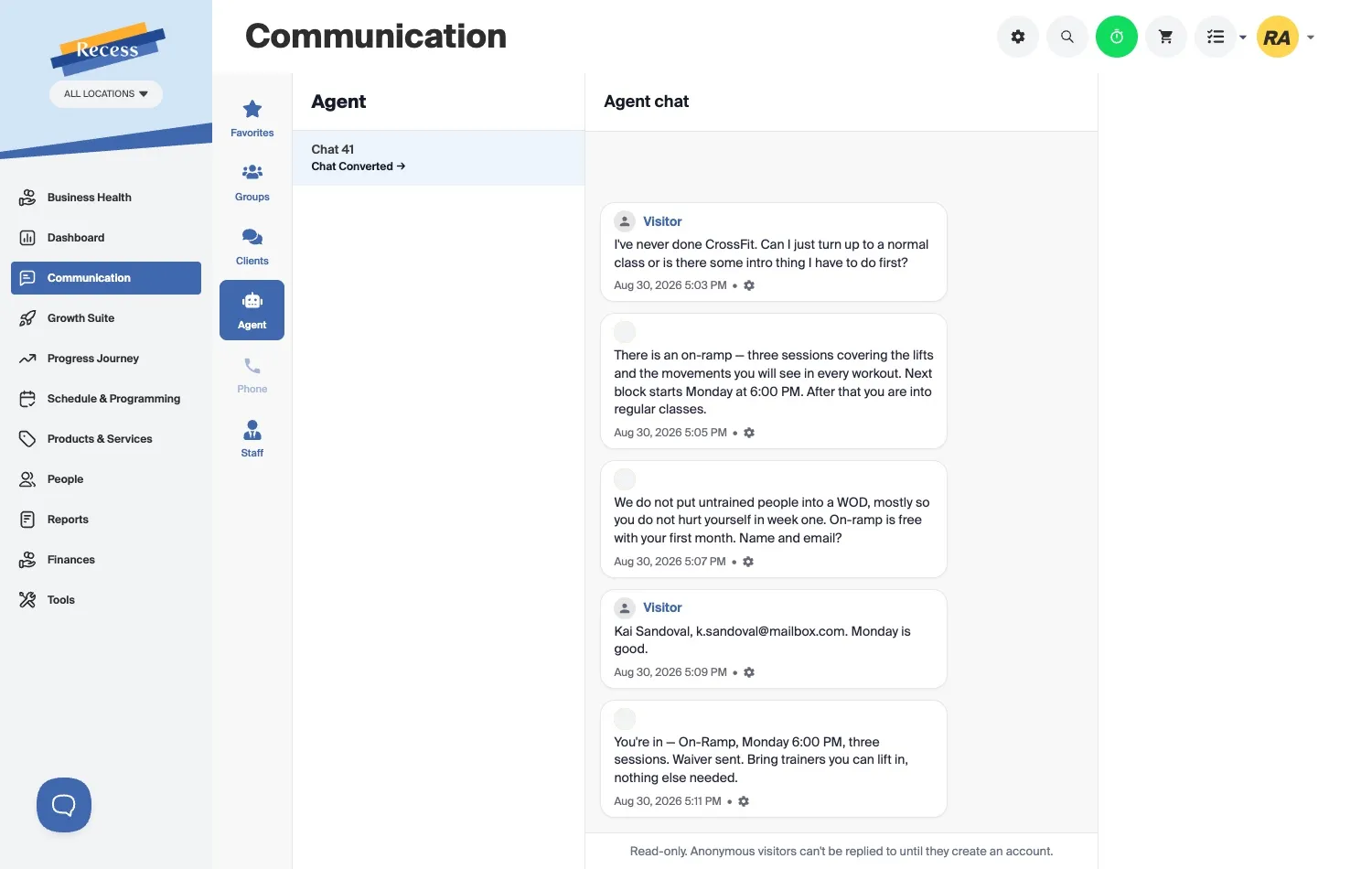
Somebody who has never done CrossFit asks what she has to do first.
It is the question boxes get more than any other, and it arrives when there is nobody at the desk to answer it: can she just turn up to a normal class, or is there an intro thing she has to do first.
The Recess lead agent answers off your real schedule. There is an on-ramp, three sessions covering the lifts and the movements that turn up in every workout, and the next block starts Monday at 6:00 PM. Untrained people do not go into a WOD in week one, and the on-ramp is free with her first month.
She gives her name and her email, Monday suits her, and she is booked before you read any of it. The waiver is already sent, and the only thing she has been asked to bring is trainers she can lift in.
The rest of the box, and none of it costs extra.
There is no plan to choose and nothing behind a paywall, so a box with sixty members runs on exactly the same system as a box with four hundred and pays the same for it, which is nothing.
Nothing a month, at sixty members or at four hundred.
No monthly platform fee, no per feature add ons, no setup cost. Recess earns a service fee of approximately 5% paid by the member at checkout, and card and bank processing is covered by Recess out of that rather than billed to you on top. It also means we only do well when you are actually collecting money, which is the incentive you want your software to have.
Boxes we are wrong for.
If one of these is you, we would rather say so now than six weeks into an onboarding.
What box owners ask before they move.
No. Recess integrates with CAP, which is where many CrossFit gyms write and track programming. We handle the class schedule, capacity, attendance, memberships, payments, payroll and retention around it. Your programming stays yours.
Through Kisi. Recess passes your membership state to the door, so entry is granted based on whether a member is active, paid and inside their access window at that moment. Access ends when a membership ends, without anyone deprovisioning a fob by hand.
Yes, and that is the main reason boxes ask about this. A member arriving before opening holds their phone to the Kisi reader, Recess checks their membership in real time, and the door opens or does not. Their visit is recorded as attendance either way, so your unstaffed hours are not a blind spot.
Yes. Class templates let you build a full box schedule once, including ten or more slots a day, open gym blocks, Saturday specials and courses like foundations. Each slot has its own capacity, waitlist and coach.
By class, by class type, or by head count, whichever matches your setup. Coaches can clock in and out, rates are held per coach, and when a substitute takes a class the pay follows the class to whoever taught it. Payroll reporting comes out of the same data.
Recess retries it, messages the member with a link to update their card, and restores the membership and their door access when they do. This is worth more than it sounds, because a meaningful share of members who look like they quit simply had a card expire.
Yes. The migration is automated and our team runs it for you, whatever you are on now: PushPress, Wodify, Zen Planner, SugarWOD, Mindbody and others. Members, history and billing information come across rather than being retyped.
No. Your gym gets its own branded app with your name, logo and colors, and it can be published on the App Store and Google Play under your own listing. Members book, pay, sign and see their progress there.