Every stripe, every sibling and Saturday's test, sorted before you locked up.
One Thursday in a school running Tigers, Juniors, Teens and Adults, and the ladder that kept all four of them moving.
100% free to use, no hidden fees. Members pay about 5% at checkout.
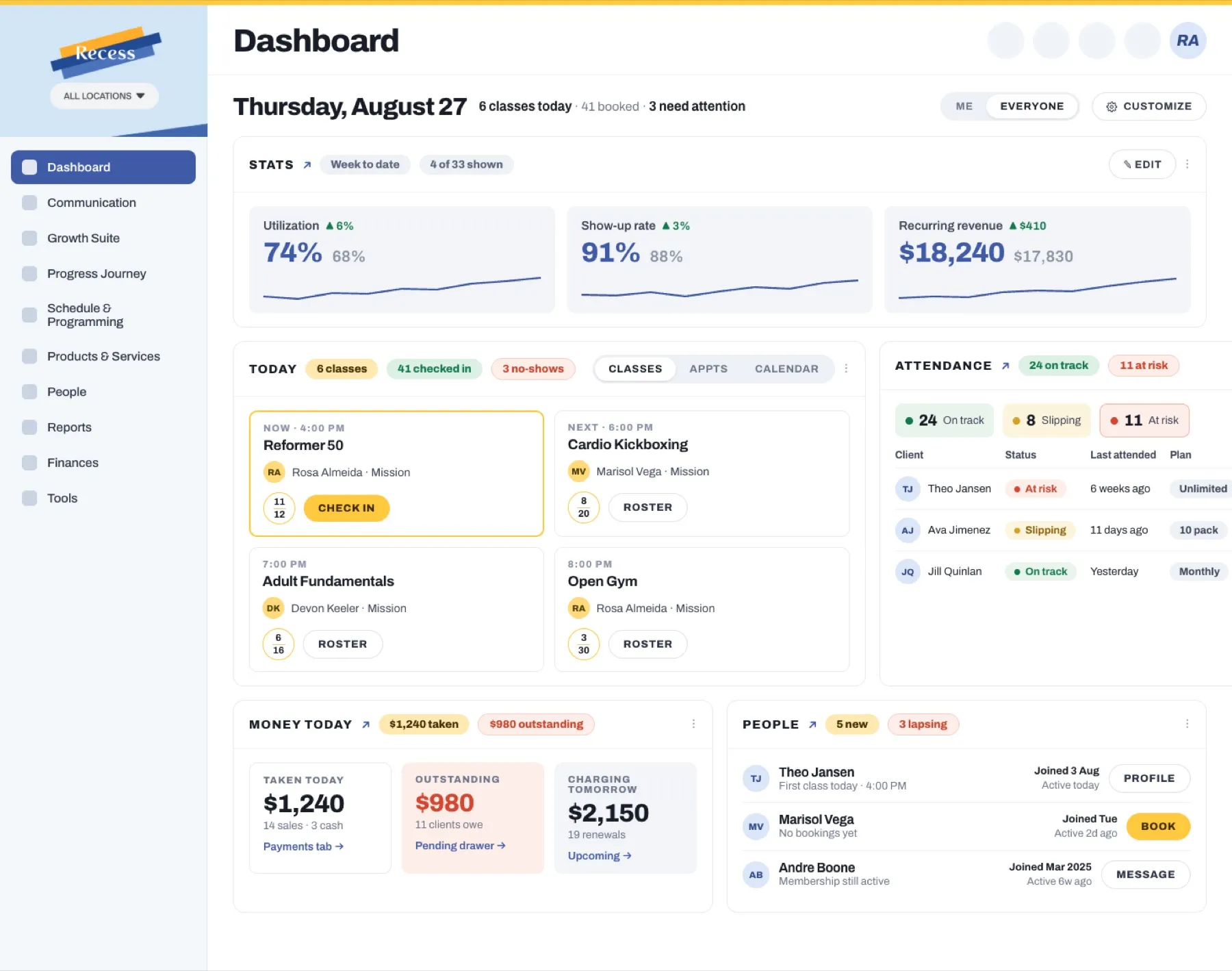
Three children, three belts, one card, and she did it in the parking lot.
She enrolled all three before the school bell, on her phone, in about four minutes. Her oldest is a green belt in Juniors, the middle one a yellow in Tigers, and the five year old started on Monday. Three ladders, one payer.
This is the case that breaks ordinary booking software, and it is the most common case you have. A family account holds the parent and the children together, and each child is a full member with her own profile, program, rank, attendance and progress rather than a line item on an adult's booking.
The sibling discount applied itself, second child at a reduced rate and third child lower again, every month, without anyone at the desk remembering. When the middle child pauses and the other two carry on, the discount recalculates instead of quietly overcharging that family for six months.
Eleven children off the bus, onto their own roster.
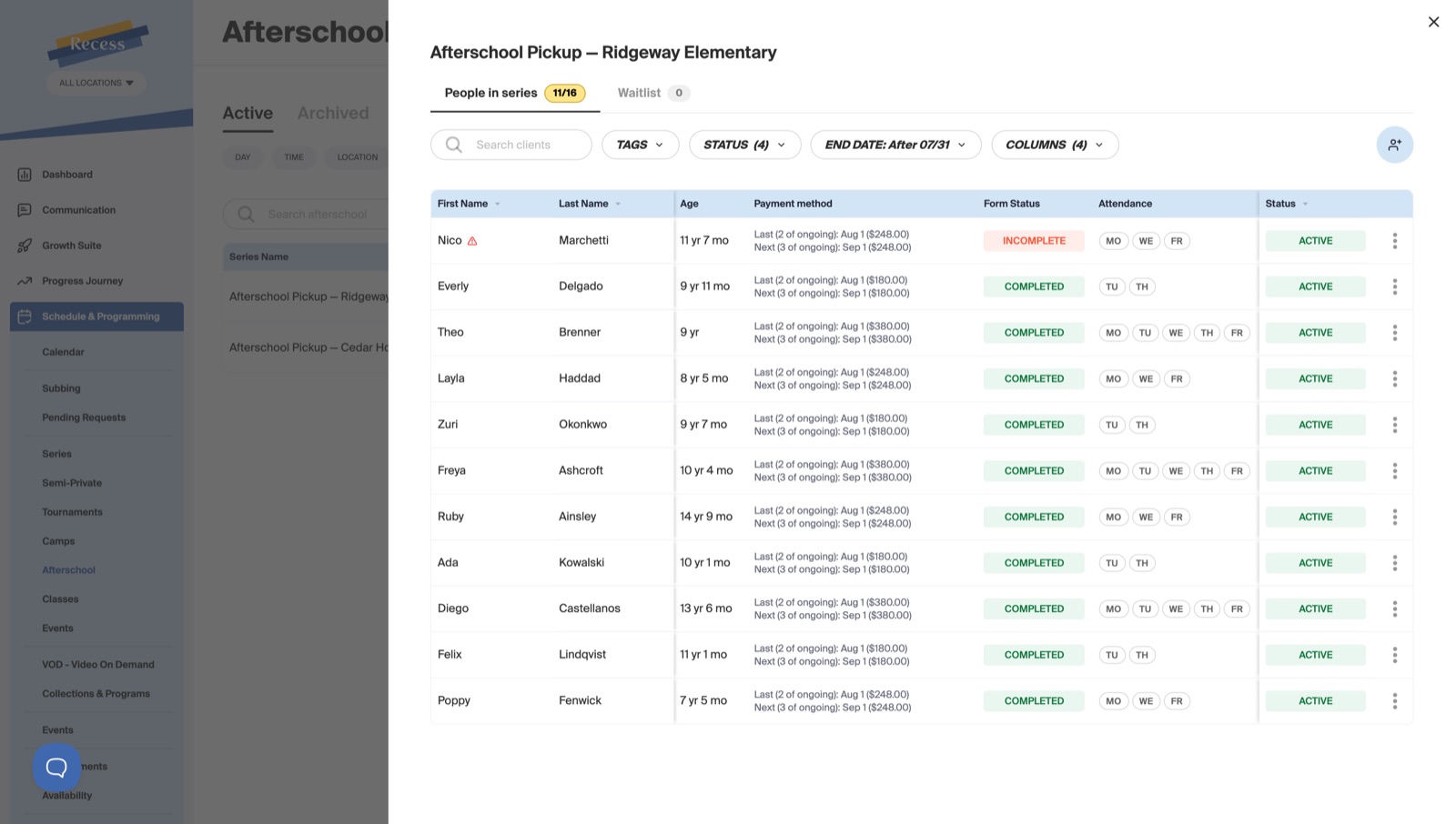
Afterschool is not a class with a different name on it. It sits beside your camps, tournaments and events rather than inside your class schedule, and it carries its own roster, its own price, its own agreement and its own attendance. Eleven of the sixteen places on this one are taken. Each child is on an ongoing instalment at their own amount, and each is booked on the days their family actually wanted, some Monday, Wednesday and Friday, some Tuesday and Thursday.
The agreement sits on the same row as the child. Ten of the eleven have signed and one is still showing an incomplete form in red, which is the sort of thing you want in front of you before the bus arrives rather than at the door. The kiosk is how they land on the roster once they do arrive, and a parent who marks a child home sick in your app that morning takes her off it before the session starts.
Camps work the same way. A week of spring break camp is a program with capacity, a weekly price, sibling pricing and its own waiver, so a parent enrolls for the week rather than booking five separate sessions. Your October tournament is an event with registration, divisions and a fee, and a field you can work from. Recess does not run the brackets, and it is not going to pretend it does.
These are the lines that make the year work financially, and the ones software usually cannot hold, so they end up in group texts and a shoebox. Here they sit beside your classes, which means a family signs up with the card, the discount and the waiver already on file.
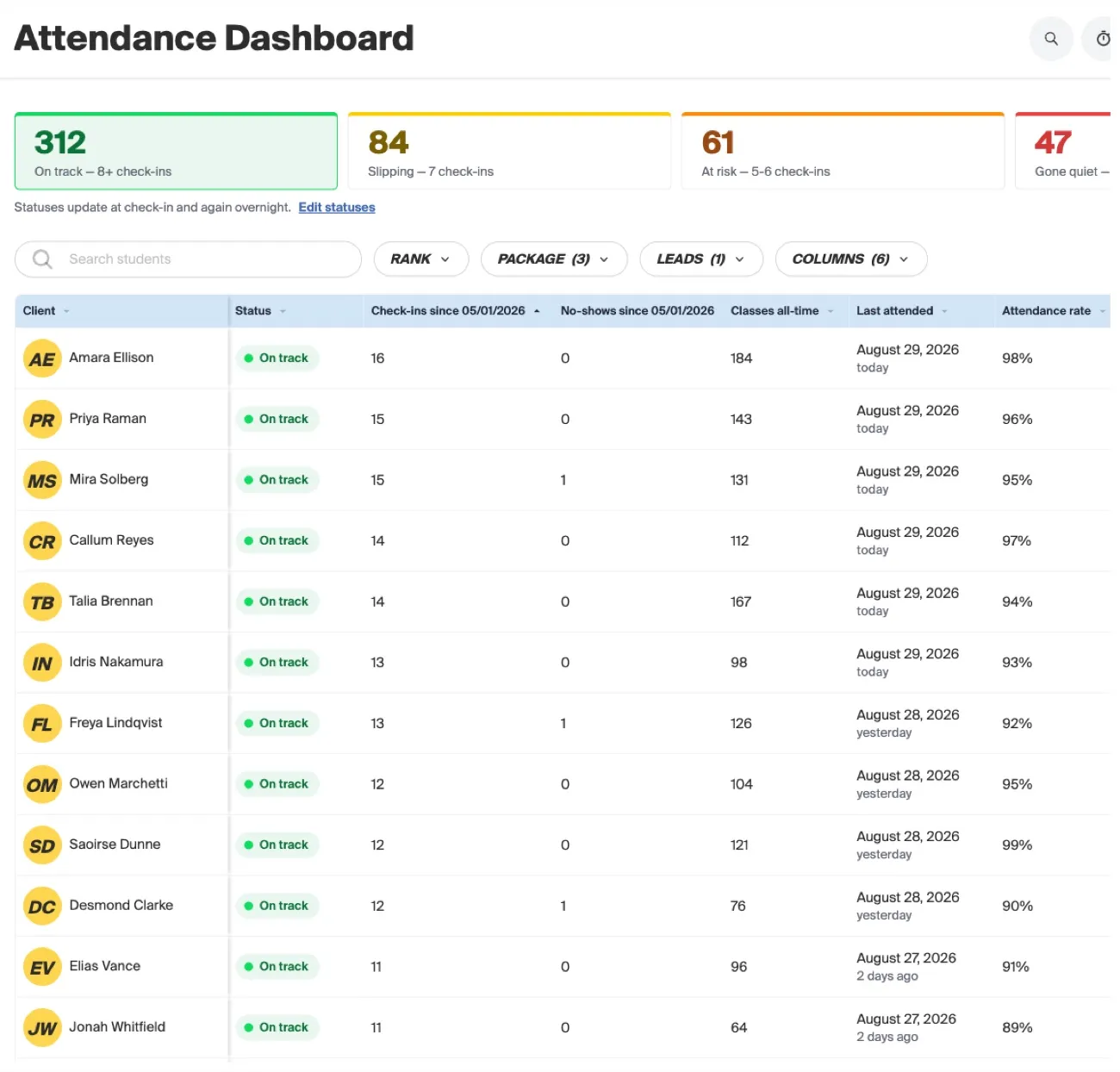
Forty Little Tigers tapped their own names on the way past.
Forty taps at the kiosk, and the attendance dashboard has already moved. Statuses update at check-in and again overnight, so on track, slipping, at risk and gone quiet are four lists you open rather than a feeling you have: 312 on eight or more check-ins, 84 down to seven, 61 on five or six, and 47 who have stopped coming. It feeds eligibility for the next rank, and it is your earliest warning that a child is drifting.
Agreements are meant to be settled long before mat time. Recess holds your waivers, your membership and program agreements and your custom forms, signed digitally at sign up, and the signed record sits on that student's profile with a date rather than on a clipboard that gets scanned in March.
Some of those you mark required, and required means what it says: a student who has not signed one is stopped at the desk. There is no override at the door, and that is deliberate, because the point of a required agreement is that a child does not train until it exists. So Recess chases the signature in advance, by text and by push, and puts the unsigned list in front of you before class. Mark as required only what a child genuinely must not train without, and leave the rest optional.
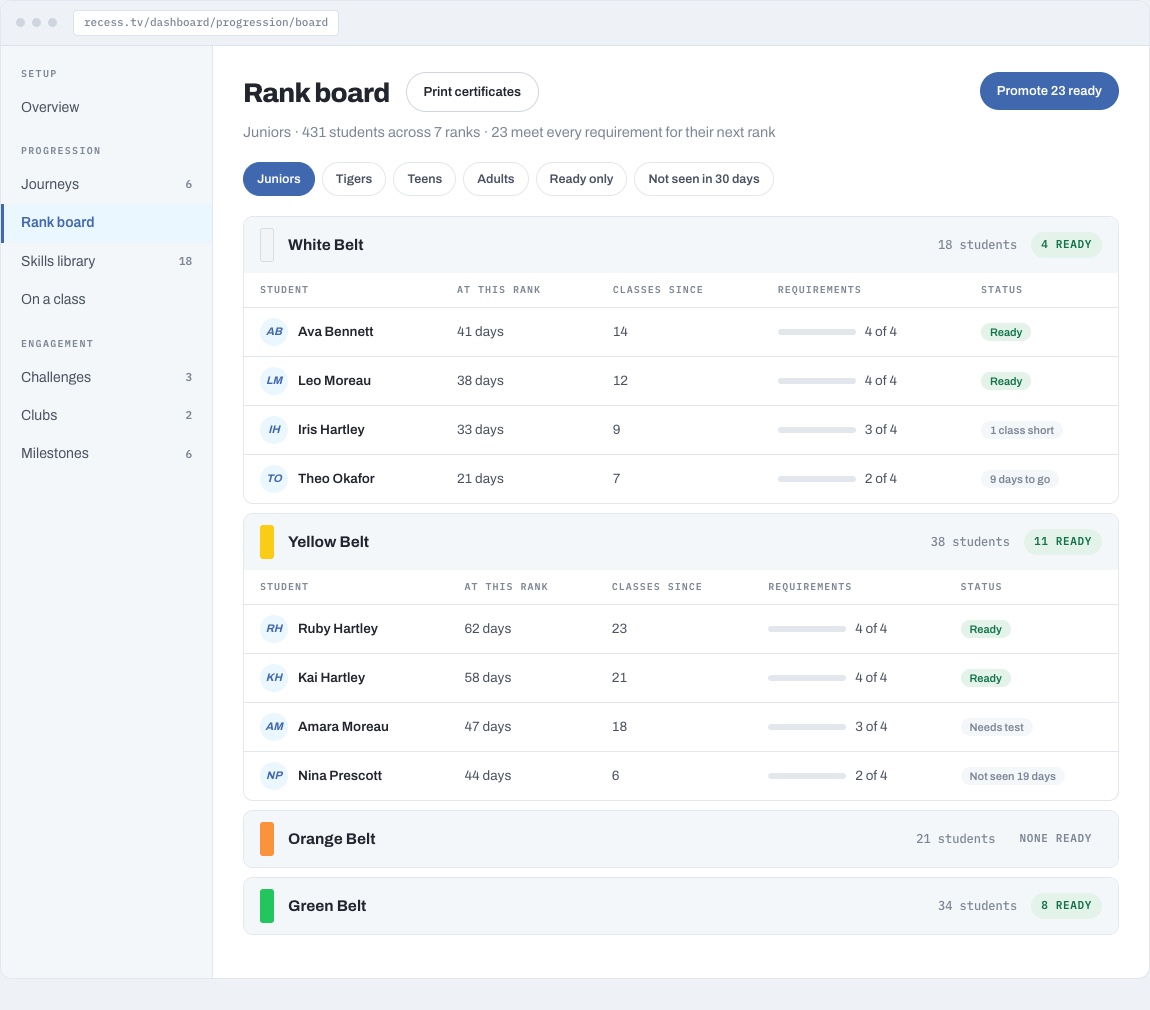
Stripes went on the board during Juniors, marked from the mat.
Your instructor did it on a tablet between rounds, not on a clipboard that gets typed up in March, by which time it is fiction.
Your ranking system is the spine of your school, and in most software it lives in a spreadsheet on the office laptop. Recess treats it as real data, and you define the ladder: the belts in your art, the stripes or tips or sashes between them, the order they come in, and what makes a student eligible. That can be a class count, time at rank, skills checked off, or your judgment as the instructor, which stays the final word. Schools that rank in levels rather than belts use the same structure.
The board is the whole school laid out by rank, which is the view you actually want on a Monday. Every belt opens into the students standing on it, with how long each has been there, how many classes since, and how much of the requirement is met. Four of four reads Ready. Three of four reads one class short. Someone who has not been in for nineteen days is on the same screen as everyone else, because that is usually the student you most need to see.
Tigers, Juniors, Teens and Adults are separate journeys with their own ladders, curricula and classes, and the seam between them has always been the awkward part. When a student crosses an age line, Recess moves her into the next program itself and applies your rule for what carries over. If a junior black maps to an adult blue at your school, you set that mapping once and it holds for everyone who crosses that line afterwards. If rank does not transfer at all, the history stays on the record anyway, which is most of the reason a family stays through the transition.
The same ladder decides who can book what. A class can require a belt or a stripe, a skill an instructor has signed off, a prerequisite class, an age range, a tag you keep on the student, or the membership the family holds, so a yellow belt is never offered Tuesday's advanced sparring in the first place.
Belt and stripe progression is the newest part of Recess and is rolling out now.
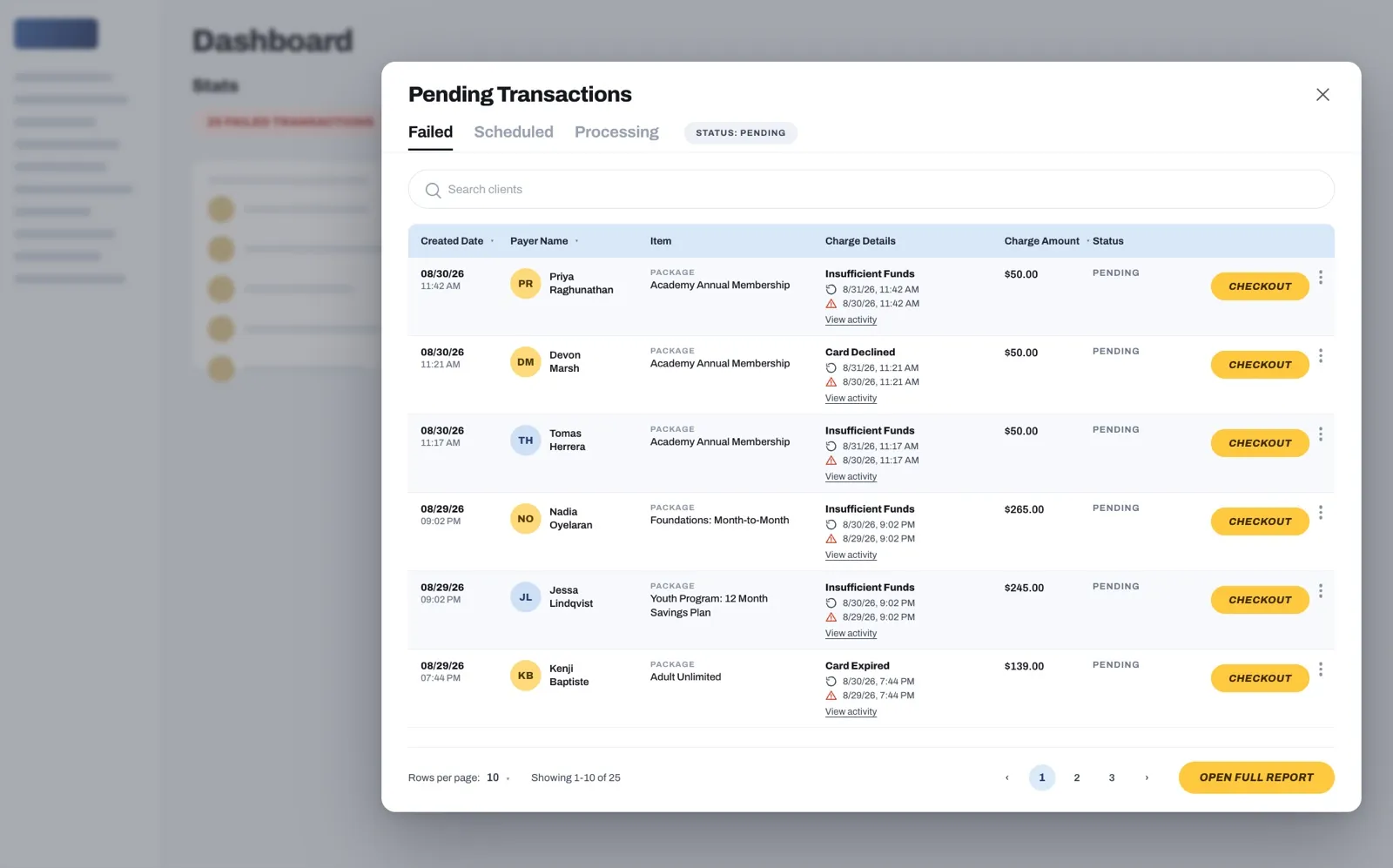
A twelve month savings plan declined at nine at night, and started fixing itself.
Martial arts schools sell terms, not drop ins. An academy annual membership, a month to month foundations program, a twelve month youth savings plan, an adult unlimited: these are agreements with a length, a price and a schedule, and Recess holds them as such, with contracts, payment plans, balances, account credit and gift cards underneath them.
Which means the thing that quietly costs you students is a card, not a decision. A large share of the families you think quit did not decide anything. Their card expired in August. Recess retries the charge, sends the parent a link to put it right, and picks the membership back up, and the whole failed list sits in one drawer instead of turning up in a bank statement.
The same watchfulness runs on attendance. A boy who came twice a week for a year and has not been in for nineteen days surfaces as a name within days rather than as a number in a churn report at quarter end, and the follow up goes out by text or email in your school's voice, from your own domain, without ever reaching your list.
Saturday's belt test built its own roster.
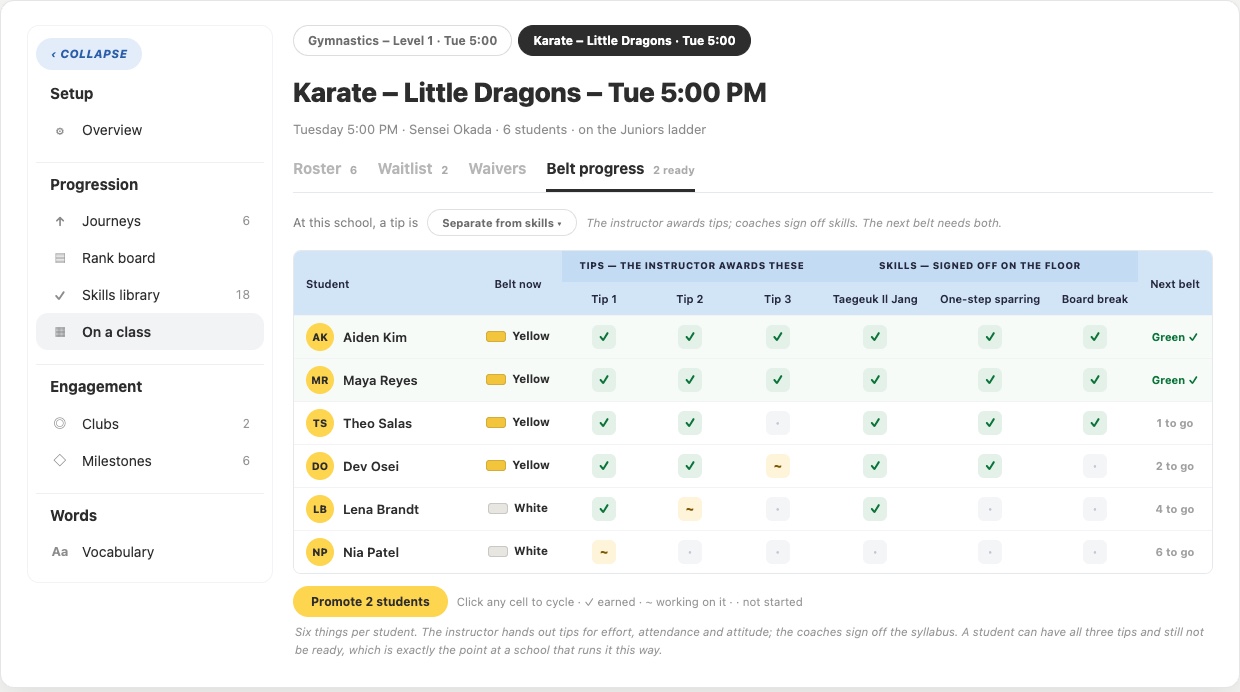
You did not reconstruct it from attendance sheets. Open the class itself and the belt progress is already there: the tips your instructor awards in one group, the skills your coaches sign off on the floor in another, and every student's next belt worked out from both. Two were ready. One was a single item short and one was two, which is exactly the conversation to have with a parent at the door rather than after a failed grading.
The testing fee is collected through the same system that already holds each parent's card. When students pass you promote them, and the promotion writes itself everywhere it has to go: the student's record, the parent's view in your app, and the certificate, which prints with the name spelled right, the rank, the date and your school's own artwork.
The pay run had drafted itself, and it flagged three names before you approved it.
Instructors are rarely salaried. They are paid per class, often at different rates for a private, a kids class or a seminar. Recess holds those rates, instructors clock in and out on the same system, and the run is built from the same data that ran the schedule rather than from somebody's memory on a Sunday.
It arrives as a draft rather than as a payment. Recess shows you what it could not work out before you approve anything, so a coach with no matching rate is flagged on the run instead of quietly coming out at nothing, and you fix the rate rather than hear about it a fortnight later. Approving is the step that locks it.

Where each child is, without having to catch you at pickup.
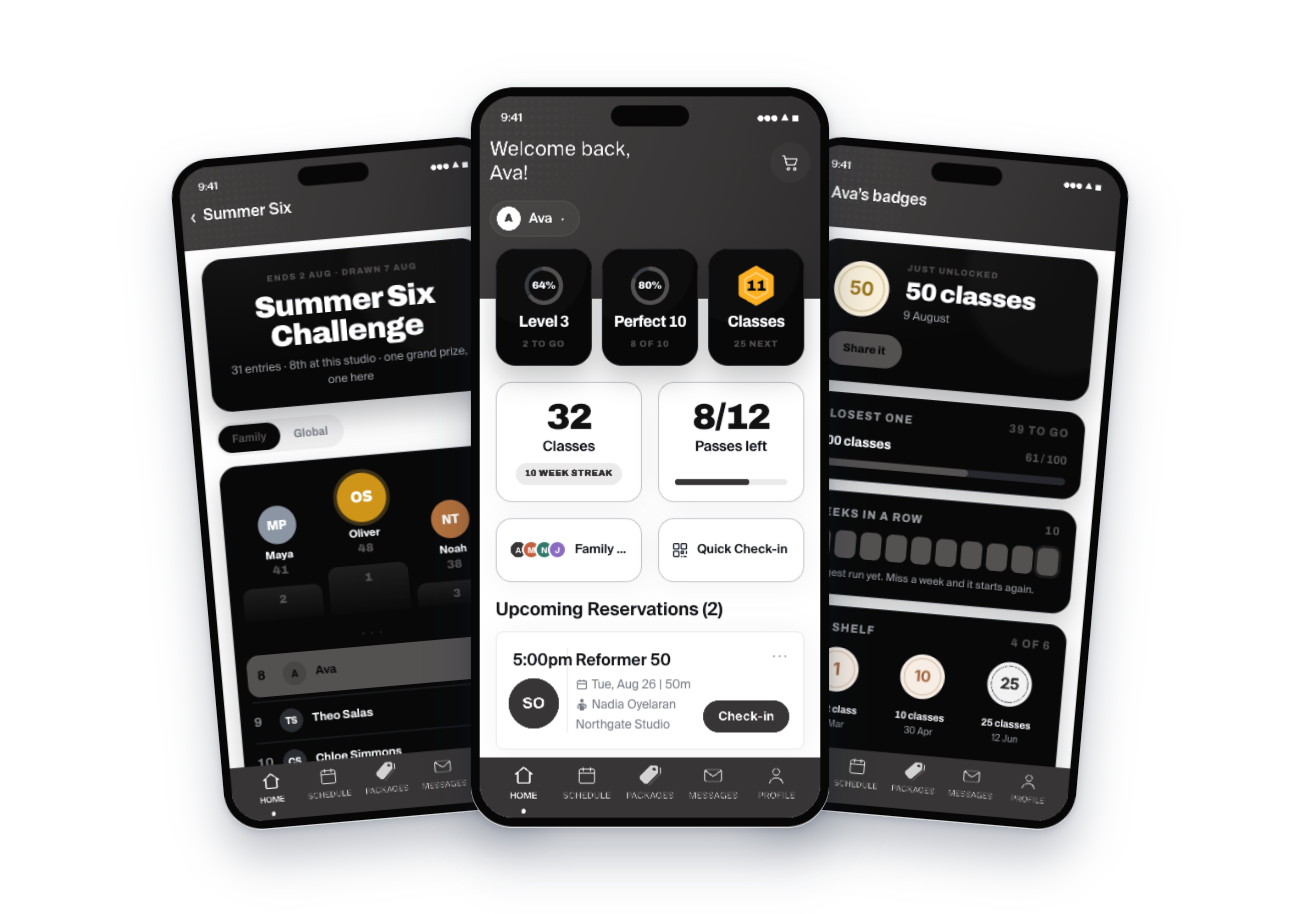
Your school gets its own app carrying your name, your logo and your colors, publishable to the Apple App Store and Google Play under your own listing. Parents will not learn a second brand to book their child's class, and nobody is asked to download another company's app to do it.
A parent switches between her children inside it and sees each one where they actually are: what is booked, how many classes are left on the plan, the streak, the badges already earned and how far the next milestone is. She can answer her own question at the kitchen table rather than waiting to catch an instructor at the door on a Thursday.
The children see it too, and that is the part that turns up in your attendance. A child who can see how close the next thing is asks to come to class. Rank sits in the same view as belt and stripe progression rolls out.
A mother asks whether her nine year old will be the only new kid.
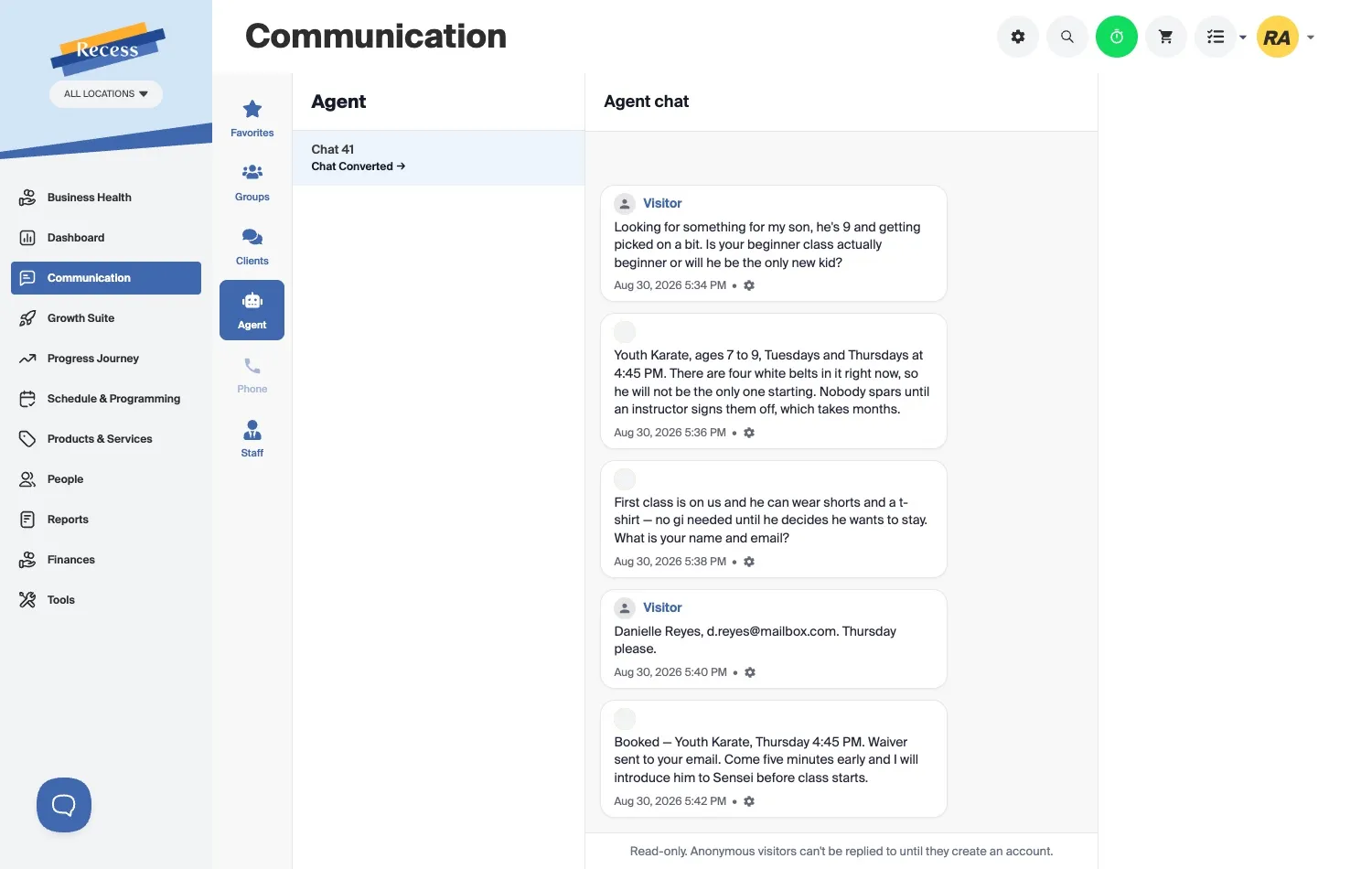
It is 5:34 on a Sunday afternoon, your school is shut, and she is on your website because her son is nine and getting picked on a bit. Her question is not about your timetable. It is whether your beginner class is actually beginner.
The Recess lead agent answers the question she asked. Youth Karate is Tuesdays and Thursdays at 4:45 for that age, there are four white belts in it right now so he will not be the only one starting, and nobody spars until an instructor signs them off, which takes months. Shorts and a t-shirt are fine. No gi until he decides he wants to stay.
Then it takes her name and email, books him into Thursday, sends the waiver and tells her to come five minutes early. You read the thread on Monday morning. They are already on the list.
The rest of what a school runs on. No tier to buy into.
Nothing on this list is an upgrade, a module or a per student tier. A school with sixty students runs the same software as one with six hundred, and pays the same for it.
Free for the school, and there is no second page to the pricing.
No monthly platform fee, no per feature add ons, no setup cost. Recess earns a service fee of approximately 5% paid by the member at checkout, and card and bank processing is covered by Recess out of that rather than billed to you on top. We only do well when you are collecting money, which is the incentive you want your software to have.
Schools we would tell to stay where they are.
If one of these is you, we would rather say so now than six weeks into an onboarding.
The questions school owners open with.
Yes. You define the ladder rather than picking from a fixed list, so it works whether you rank in belts, stripes, tips, sashes, levels or skills. You set the order, what makes a student eligible, and what shows on the certificate. Instructors mark ranks from the mat on a tablet rather than updating a spreadsheet in the office. Belt and stripe progression is the newest part of Recess and is rolling out now.
Recess moves them into the age appropriate program automatically. You set the rule once, which program they graduate into and whether rank carries over, and every student who crosses that line afterwards is moved without anyone doing it by hand. Many schools map a junior rank to a lower adult rank. Either way the full history stays on the record.
Yes, and this is a core case rather than a workaround. The family account holds one payer and several children, each with their own program, rank and attendance. Sibling discounts apply in the right order and recalculate when a child pauses or leaves.
Yes. Camps run as week long programs with their own capacity, pricing and waivers. Afterschool runs as a recurring program with its own roster. Tournaments run as events with registration, divisions and fees, all using the card and agreements already on file for that family. Recess hands you the field, but it does not run the brackets.
If you marked that agreement required, yes, and there is no override at the door. That is what required is for. Recess chases the signature in advance by text and push and gives you the unsigned list before class, so it is caught at the desk rather than on the mat. Mark as required only the agreements a child genuinely must not train without, and leave the rest optional.
Two ways. It surfaces the drop off early, because attendance is tracked per student and a child who stops showing up is visible in days, not at quarter end. Then it acts, with automated win back sequences and recovery of failed payments, which cause more silent departures than most owners expect.
Yes. The migration is automated and our team runs it for you, whatever you are on now: Kicksite, Spark, MyStudio, PerfectMind, Momence, Zen Planner and others. Students, history and billing information come across, so your next term starts with records rather than a blank list.
No. Your school gets its own branded app with your name, logo and colors, published on the App Store and Google Play under your own listing. Parents book, pay and sign there, switch between their children, and each child can see their own progress.